
Wallet Overview
Your Bullets Wallet is where you manage your balance. From here, you can deposit funds, withdraw your balance, and view your wallet activity. The wallet is designed to make funding your account quick and simple, whether you prefer cryptocurrency or traditional payment methods.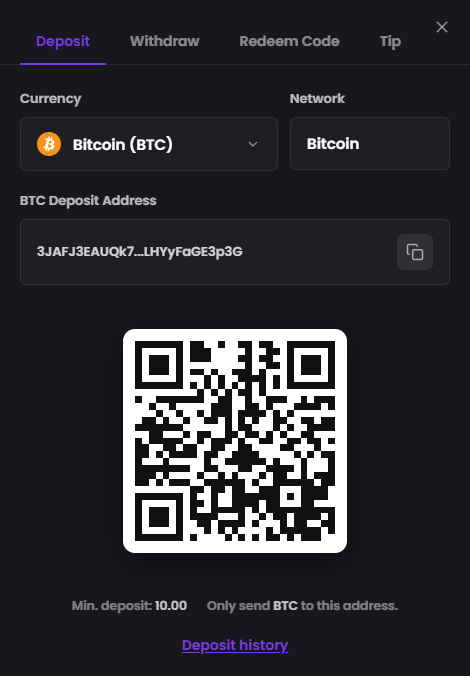
Blurred for privacy reasons.
Depositing Funds
Bullets supports both cryptocurrency and fiat payment methods.Supported Cryptocurrencies
You can deposit using:- Bitcoin (BTC)
- Ethereum (ETH)
- Litecoin (LTC)
- Solana (SOL)
- USDT - BEP-20, ERC-20, Sol
- USDC - BEP-20, Sol
Supported Fiat Payment Methods
You can also deposit using:- Venmo
- Cash App
- PayPal
- Wise
- Revolut
- Zelle
- Monzo
- Chime
Depositing Cryptocurrency
Depositing cryptocurrency is simple.- Open your Wallet.
- Select the cryptocurrency you’d like to deposit.
- Copy your deposit address or scan the QR code.
- Send your cryptocurrency to that address.
Note: Always ensure you’re sending the correct cryptocurrency to the matching wallet address. Sending the wrong asset to an address may result in the loss of your funds.
Minimum Deposits
Each cryptocurrency has a minimum deposit amount, which is displayed inside the Wallet before you send funds. These minimums exist to ensure deposits can be processed successfully. Although minimum deposit amounts may occasionally be updated, they do not change without notice. If we ever need to adjust a minimum deposit amount, we’ll provide at least 24 hours’ notice before the change takes effect. This means you won’t be caught out while you’re in the process of making a deposit. Because these values rarely change, you can generally rely on the minimum amounts displayed in your wallet.Depositing with Fiat
Depositing with a fiat payment method is just as easy.- Open your Wallet.
- Select your preferred payment method.
- Enter the amount you’d like to deposit.
- Click Continue to Payment.
- Follow the payment instructions shown on screen.
Deposit Processing Times
Fiat Deposits
Once your payment has been successfully completed, your funds are typically credited to your Bullets wallet within 15 seconds.Cryptocurrency Deposits
Cryptocurrency deposits are credited once they’ve received the required confirmations on their respective blockchain. The time this takes depends on the cryptocurrency you’re sending. For example:- Solana transactions are typically confirmed very quickly.
- Bitcoin transactions generally take longer because confirmation times depend on the Bitcoin network.